Average CSV Columns
A CSV table can hold scores or amounts, but it does not calculate their mean. Average numeric CSV columns here when you need a clear summary before you use the table in JSON, XLSX spreadsheet, or a dashboard.
How Average CSV Works
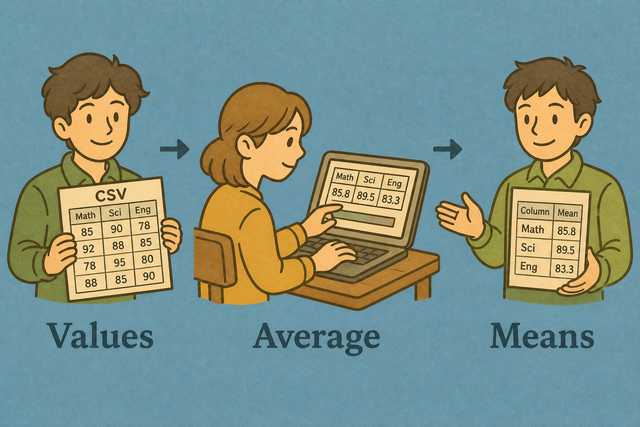
1. Add CSV data
2. Calculate column averages
3. Copy or download the result
Supported Formats
Add CSV Data
You can paste CSV data, upload a file, or use an example
CSV parsing status
No CSV data to parse
You can paste CSV data, upload a file, or use an example
Average CSV Columns
Each numeric column receives one average. Empty cells do not count as zero.
How to average CSV columns
A CSV file can contain values that need a quick summary, such as test scores of 72, 84, and 90. This tool calculates each numeric column in your browser, so the original table stays available while you review the result.
- You can add your data Paste CSV text or upload a file. The tool can parse the values only after the rows are present.
- You can check the format Set the separator and header option to match the source. This keeps values in the correct columns.
- You can review the result Copy or download the averages after checking the headers. A quick review helps catch a wrong separator or nonnumeric value.
CSV averages in practice
What is CSV?
CSV is a plain text table with one row per line and fields separated by commas, semicolons, tabs, or pipes. For example, a row such as Score,72,84 gives the tool two numeric values to average. The separator setting matters because it tells the parser where one field ends and the next begins.
CSV average example
Example input
Name,Score,Group
Ada,36,A
Lin,29,B
Example output
Name,Score,Group
Ada,36,A
Lin,29,B
Common CSV average problems
Can numeric fields keep leading zeros?
A value such as "00123" can represent an identifier, not a quantity. Quoting it keeps the zeros in the CSV text, while spreadsheet software may display or convert it differently. This tool does not remove those zeros during parsing.
Why does everything appear in column A?
A file that places every field in column A often uses semicolons or tabs instead of commas. Select the matching Value Separator because the parser then splits each row into the intended columns.
Why do accented characters look wrong?
Text such as é can look corrupted when the source uses Windows 1252 and the file is read as UTF 8. A UTF 8 export keeps the characters consistent because the same character encoding is used from export through parsing.
Average CSV questions
Does Average CSV upload my file?
No. The averages are calculated in your browser, and this page does not upload the CSV. For example, a local file containing scores stays on your device while the numeric columns are parsed. The result can be copied or downloaded after you review it.
Are empty cells included?
Empty cells are ignored, so they do not count as zero. For example, values 10, empty, and 20 produce an average of 15 because only the two numeric values are included. This keeps missing data from changing the result as if it were a measured zero.
Can I average every numeric column at once?
Yes. The tool calculates one average for each numeric column in the CSV. For example, Score and Amount receive separate means while a Name column is skipped. This gives you a compact summary without combining unrelated fields.
Which columns are averaged?
The tool averages columns whose cells parse as numbers and skips text, dates, and empty cells. For example, a Score column is included while a City column is not. This prevents labels from being treated as measurements.
How are empty cells treated in the average?
Empty cells are ignored, not treated as zero. For example, 4, empty, and 8 produce an average of 6. This treatment reflects the two recorded values instead of lowering the result for missing data.
Can I average grouped by another column?
This tool returns one average for each numeric header and does not create grouped averages. For example, it can average Score for the full table, but separate averages by City require a filtered CSV for each group. Filtering first works because each input then represents one group.