Sum CSV Columns
A CSV table can hold quantities, prices, scores, or salaries, but it does not calculate their totals. Sum CSV columns to check a dataset before you use the values in JSON, XLSX spreadsheet, or a report.
How CSV column sums work
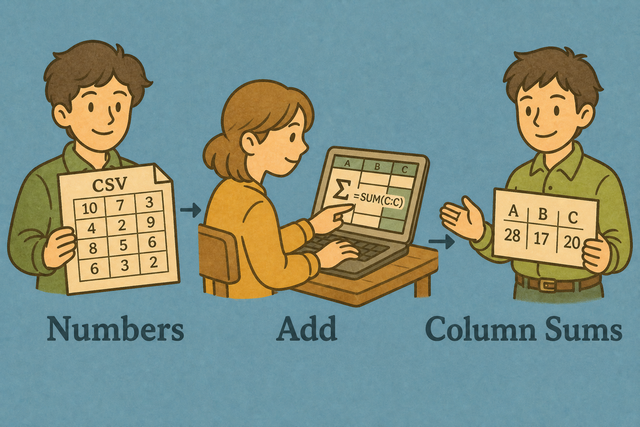
1. Add CSV data
2. Review column totals
3. Copy or download the result
Input format
Add CSV data
You can paste a table, upload a file, or view an example
Parsing status
No data has been added
You can paste a table, upload a file, or view an example
Column totals
You can add numeric CSV columns and review each total.
How to use Sum CSV Columns
A CSV file can contain the values you need, but a separate total is often easier to check or share. For example, a quantity column can show the total number of items before the data moves into another table.
- You can add your data. Paste CSV text or upload a file. Local parsing keeps the source table on this device.
- You can set the separator. Choose comma, semicolon, tab, or pipe and keep the header option on when the first row names the columns. Matching the source layout prevents values from shifting into the wrong columns.
- You can review the totals. Copy or download the result after checking the column names. A quick review helps catch a wrong separator or a text value in a numeric column.
What CSV column sums contain
What is CSV?
CSV is a plain text table with one row per line and fields separated by a comma, semicolon, tab, or pipe. For example, Name,Quantity can contain Ada,3, which makes the quantity available for a column total without formulas or styling.
Sample input and totals
Example CSV input
Name,Age,City
Ada,36,London
Lin,29,Taipei
Example totals output
Name,Age,City
Ada,36,London
Lin,29,Taipei
Common CSV sum problems
Will leading zeros disappear?
A value such as "00123" is an identifier, not a quantity, so its leading zeros matter. Quoting the field keeps the zeros during parsing, and this tool does not include that text value in a numeric total.
Why is everything in one column?
The source may use semicolons or tabs instead of commas. Choose the matching Value Separator because the parser then recognizes each field boundary correctly.
What about text encoding?
Accented text can look incorrect when the source uses a different encoding. UTF 8 usually preserves those characters across CSV tools, so a UTF 8 export gives the parser the same text that you see in the source.
Sum CSV Columns questions
Does Sum CSV Columns upload my file?
No.
The page parses and totals CSV data in your browser, so the file stays on your device while the page is open This local method is useful for private tables because the source data does not need to be sent to a server.
Which columns are summed?
Columns with numeric values are summed, while text columns are skipped.
A header row helps the result identify each total, and the correct Value Separator keeps values in their intended columns.
Can I sum a salary column?
Yes.
A salary column with numeric values can be totaled along with other numeric columns Review the header and separator first because those settings determine whether each salary value is read as its own field.
Do empty cells count as zero?
Empty cells are ignored when the page adds a numeric column.
This prevents missing entries from changing the total, while text values remain outside the calculation.
Can I sum one column only?
The result lists totals by column, so you can read the total beside the header you need.
If the source has one target column, checking its header and nearby values makes the result easier to verify.
Can I sum CSV columns without spreadsheet software?
Yes.
You can paste or upload the CSV, and the page calculates numeric column totals in your browser CSV contains plain values rather than workbook formulas or styles, so this focused result is suitable when you need a quick total from one table.