CSV to Base64 Encoder
A CSV file stores rows and columns as plain text, while Base64 represents that text with a transport safe character set. For example, a table with commas and line breaks can be encoded before it is placed inside JSON or another text payload.
How CSV to Base64 works
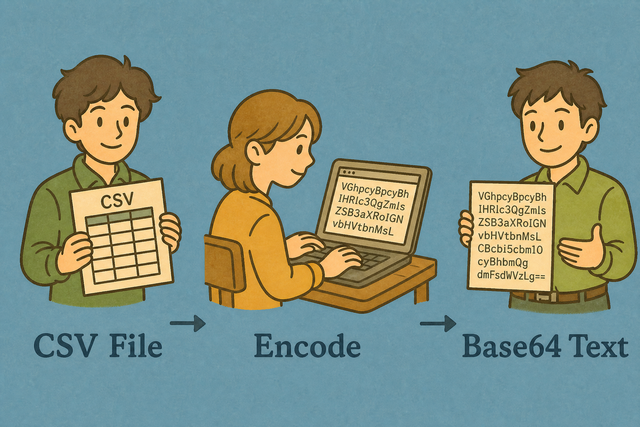
1. Add CSV data
2. Convert it to Base64
3. Copy or download the result
Supported Formats
Import CSV Data
You can add CSV data, upload a file, or view an example
Parsing Status
No data to parse
You can add CSV data, upload a file, or view an example
Base64 Output
You can convert the imported CSV into Base64 text that you can review, copy, or download.
How to use CSV to Base64
A CSV table can be difficult to place inside a text payload when commas and line breaks have meaning there. For example, an API field may accept one Base64 string instead of raw rows. This CSV to Base64 converter processes the data in your browser, so the method keeps the conversion close to your work.
- You can import your data. Paste CSV or upload a file. The conversion runs in this browser, which keeps the input available for local processing.
- Tune options. Set the separator and header setting so the parser reads your locale and schema correctly. This prevents a semicolon file or a header row from being treated as ordinary data.
- You can export Base64. Review the result, then copy or download it. A review helps you catch an incorrect separator before another system receives the text.
What CSV and Base64 mean
What is CSV?
CSV, or comma-separated values, stores a table as rows of plain text. For example, Name,Age places two fields in one row, with commas separating the values. You can choose semicolons, tabs, or pipes when the source file uses another separator, because matching the separator preserves the columns.
What is Base64?
Base64 represents text with a limited ASCII character set. For example, encoding a CSV before placing it in JSON keeps the table content inside one string, but Base64 does not compress the file.
CSV to Base64 example
Example input
Name,Age,City
Ada,36,London
Lin,29,Taipei
Example output
TmFtZSxBZ2UKQWRhLDM2Common CSV to Base64 problems
Will leading zeros disappear?
A value such as "00123" can lose its leading zeros when a spreadsheet program interprets it as a number. Keep the value quoted in the CSV and check the decoded result, because the converter preserves the text it receives.
Why is everything in column A?
The file may use semicolons or tabs instead of commas. Select the matching Value Separator, because the parser can then place each field in the intended column.
What about UTF-8 vs Windows-1252?
Text may look wrong when the source uses Windows-1252 instead of UTF-8. Re-export the file as UTF-8 when possible, because consistent text encoding keeps accented characters readable after conversion.
CSV to Base64 FAQ
Does CSV to Base64 upload my file?
No. The conversion runs in JavaScript on this page, so the CSV stays in your browser during processing. For example, a customer list can become Base64 text without being sent to a server.
This local method works because the page parses the file and creates the output on your device. The same approach keeps the separator, quoted commas, UTF 8 text, and quoted values such as "00123" available for your review before you copy or download the result.
Why encode CSV as Base64?
Base64 helps when a text payload needs one encoded value instead of raw CSV rows. For example, JSON can carry the encoded table as a string when commas and line breaks would conflict with the surrounding syntax.
This conversion changes the representation, not the table purpose. The output is useful when the receiving system expects Base64, while the CSV separator and header setting still matter because they determine how this page reads the input.
How do I get my CSV back?
You can use the Base64 to CSV decoder with the same encoded string. For example, you can copy the downloaded text into the reverse converter and review the restored rows there.
The reverse method works because Base64 decoding restores the original text representation. Keep the original string intact, then check the separator and header setting when the decoded CSV needs to match the source table.
Is Base64 compressed CSV?
No. Base64 is an encoding, not compression, and it usually makes the text larger. For example, a short CSV becomes a longer string that is easier to place in a text field.
Compression and encoding solve different problems. Base64 makes the content suitable for text transport, while a separate compression method would reduce size before another system receives the data.
Can I reverse CSV to Base64?
Yes. The reverse operation uses Base64 to CSV, not another CSV to Base64 conversion. For example, an encoded string can be decoded back into CSV text for inspection or reuse.
This works because Base64 encoding is reversible when the complete string is preserved. The decoded table may still need the correct separator and character encoding so its columns and text appear as expected.
Does Base64 encoding change my CSV values?
No. Base64 changes how the CSV text is represented, not the values in its rows. For example, a quoted value such as "00123" remains part of the original text when the complete string is decoded.
The result depends on preserving the full encoded string and reading the CSV with the intended separator. Review the decoded output because another spreadsheet program may interpret numbers or leading zeros differently after opening the file.