Hide a Short Message in CSV
A CSV table can carry a short note in trailing whitespace while its visible cells stay the same. This tool suits a small reminder or test message when the file still needs to open as ordinary CSV.
How the CSV Message Works
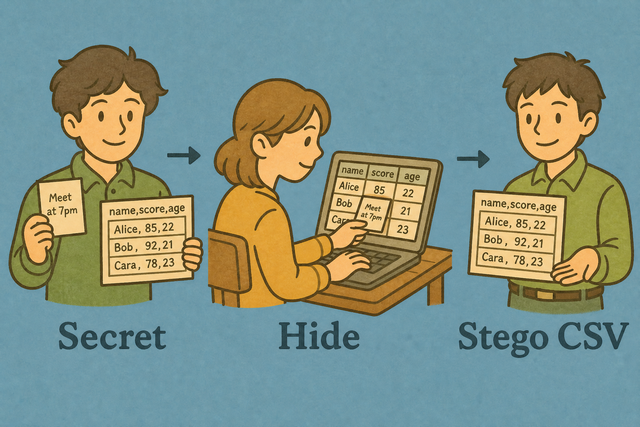
1. Add CSV data
2. Add a short message
3. Copy or download the CSV
Input format
Add CSV data
You can add a table by pasting data, uploading a file, or using the example
Data status
No CSV data yet
You can add a table by pasting data, uploading a file, or using the example
CSV with a short message
The visible cells stay unchanged while the message is stored in whitespace.
How to place a short message in CSV
A visible table may need a short note without an extra column. For example, a two column contact list can carry a brief internal label while it remains valid CSV. This tool processes the data in your browser, so the file stays on your device during conversion.
- You can add your data. Paste CSV or upload a file, then choose the separator that matches the source. Matching the separator keeps each field in the correct column.
- You can add the message. Enter a short phrase and review the output. A short message fits the available whitespace with less risk of changing the table structure.
- Save the result. Copy or download the CSV, and keep the original file because some editors remove trailing spaces.
CSV structure and message storage
What is CSV?
A CSV file stores one row per line, with fields separated by commas, semicolons, tabs, or pipes. For example, Name,Age can be followed by Ada,36. The separator must match the source because a mismatch can place the entire row in one column.
Example CSV before and after
Input example
Name,Age,City
Ada,36,London
Lin,29,Taipei
Output example
Name,Age,City
Ada,36,London
Lin,29,Taipei
Common CSV problems
Can leading zeros disappear?
A value such as "00123" can lose its leading zeros when a spreadsheet app treats it as a number. Quoting the value preserves the text in CSV, and this tool does not remove those zeros while it parses the file.
Why is every field in one column?
The file may use semicolons or tabs instead of commas. Change Column separator to match because the parser can then split each row into its intended fields.
What about text encoding?
UTF-8 is the safest common choice for accented characters. If text looks wrong, the source may use another encoding, so saving the source as UTF-8 can restore the intended characters.
Short message in CSV FAQ
Does this tool upload my CSV?
No. The tool processes the CSV in your browser, so the file stays on your device while the message is added. This matters when the table contains private names, addresses, or internal notes.
Will the hidden message change visible values?
No. The visible cell values remain the same because the message uses trailing spaces rather than a new column. A quick comparison with the original CSV can confirm the table structure before you share it.
How much text can I hide?
This tool is for a short phrase, not a long document. Short text fits more easily in available whitespace and keeps the output practical to inspect.
How is the secret stored?
The message is represented by bits in trailing spaces at the ends of cells. The visible table remains ordinary CSV, but an editor that trims trailing spaces can remove the message.
Will a spreadsheet app strip the hidden message?
Some spreadsheet editors remove trailing spaces when they open or save CSV. Keep the original and use the downloaded file directly when preserving the message matters.
Is this real steganography?
This is a simple demonstration of hiding text in CSV whitespace, not a secure communication channel. Do not use it as encryption because the message can be lost or discovered when software normalizes spaces.