Sort CSV by Column
An export can place customer names, dates, or amounts in an order that does not help your next task. For example, a sales table becomes easier to review when its Amount column runs from lowest to highest. Sort a CSV by column here, then copy or download the ordered rows so the next import receives a clear table.
How sorting works
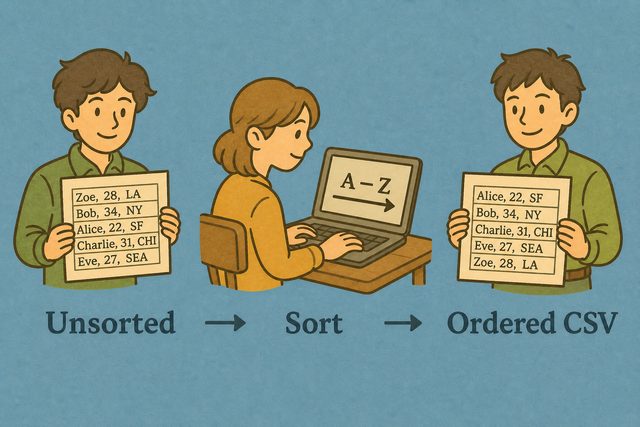
1. Add data
2. Choose a column and direction
3. Copy or download the result
Supported format
Add CSV data
You can paste data, upload a file, or use the example
Parsing status
No data is ready to parse
You can paste data, upload a file, or use the example
Sorted CSV result
The sorted rows appear here after you add data and choose the sort options.
How to sort a CSV by column
A table can be hard to review when rows arrive in export order. For example, a list of people is easier to scan after the Name column is sorted alphabetically. This tool sorts CSV in your browser, so the original file stays on your device while you prepare a clean CSV for another system.
- You can add your data. Paste CSV or upload a file. The sorting runs in this browser, so the data remains on this device.
- You can choose the options. Set the separator, header setting, column, and direction so the result matches your table.
- You can review the result. Copy or download the sorted CSV because the preview lets you check the order before another system receives it.
What CSV is
What is CSV?
CSV is a plain text table with one row per line and fields separated by a delimiter such as a comma, semicolon, tab, or pipe. For example, Name,Age can represent two columns without formulas or styling. Choose the separator that matches the source file because the parser can then keep each value in its intended column.
Sample sorted CSV
Example input
Name,Age,City
Ada,36,London
Lin,29,Taipei
Example output
Name,Age,City
Ada,36,London
Lin,29,Taipei
Common CSV problems
Will leading zeros disappear?
A value such as "00123" can lose its first zeros when a spreadsheet program treats it as a number. Keep the value quoted in the CSV and set the destination column to Text because those choices preserve an identifier rather than changing it into a number.
Why is everything in column A?
A file can show every row in column A when its separator is a semicolon or tab instead of a comma. Select the matching Value Separator because the parser then separates fields at the characters used by the source file.
What about UTF 8 and Windows 1252?
Accented names can look damaged when the file encoding does not match the text encoding. Use UTF 8 when the source supports it because it represents a broad set of characters consistently across systems.
Sort CSV frequently asked questions
Does Sort CSV upload my file?
No. Sorting happens in your browser after the page loads, and this page does not send the CSV to a server. For example, you can paste a customer list, sort it, and download the result on the same device. This local method keeps the file available for your review without requiring an account.
Does it sort numbers correctly?
Yes. Values that parse as numbers are compared numerically, so 9 comes after 10 only when the values are treated as text. For example, an Amount column can be ordered from 2 to 100 instead of alphabetically. Keep the column values consistent because mixed text and numbers can produce a different order.
Can I sort CSV descending?
Yes. Select Descending in the Direction field. For example, a Date or Amount column can show the newest or largest values first. The option changes row order while keeping each row together.
How do I sort a CSV by a column?
You can add the CSV, keep First row is header selected when the first line contains column names, and enter that column name in Sort column. Select Ascending or Descending, then review the result before copying or downloading it. These settings identify the key field and keep the header out of the data rows.
Is sorting stable?
Rows with equal sort values keep their previous relative order when the browser sort preserves it. For example, two records with the same city usually remain in their original order. Use a second sorting step or a more specific key when equal values need a defined order.
Can I sort CSV online without spreadsheet software?
Yes. You can sort CSV in this browser without installing a spreadsheet program. For example, paste a plain text table, choose a column, and download the ordered CSV. CSV stores values and separators, so formulas, formatting, and multiple workbook sheets are not part of this result.