CSV Validator
A CSV can look like a table while one extra separator creates a new field or one missing value shortens a row. CSV Validator checks the structure before an import, so your next tool receives consistent columns.
How CSV Validation Works
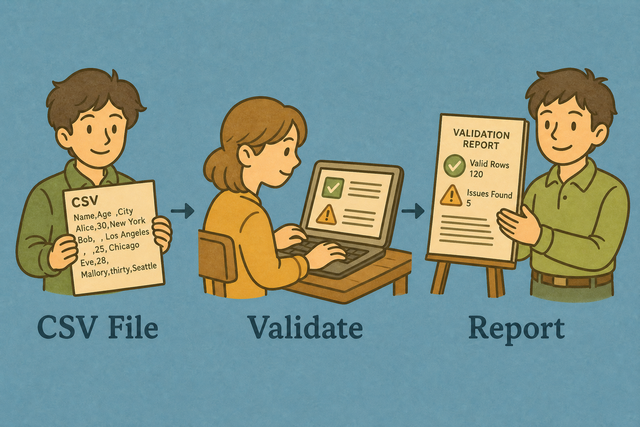
1. Add CSV data
2. Review validation
3. Copy or download the report
Supported Formats
Add CSV Data
You can paste CSV, upload a file, or view an example
Validation Status
No data to validate
You can paste CSV, upload a file, or view an example
CSV Validation Report
You can check row widths, headers, and empty cells before your CSV reaches another system.
How to use CSV Validator
A file can import into one system and fail in another when rows have different widths. For example, a missing value in one customer row can shift later fields during an import. CSV Validator checks the table in your browser before you share or convert it, which keeps the report close to the source data.
- You can add your data: Paste CSV or upload a file. The validator reads it in this browser, so the source stays on your device.
- You can set the options: Choose the separator and identify the header row. Matching the source format prevents quoted commas or semicolons from being counted as the wrong fields.
- You can review the report: Check the row and cell findings, then copy or download the report. A clear report helps you correct the source before an import.
CSV format basics
What is CSV?
CSV stores a table as plain text, with one row per line and fields separated by a chosen character. A comma separated file may use commas, semicolons, tabs, or pipes, so the separator matters when a row such as Ada,36,London is read. The format carries values and columns, not formulas or visual styling, which makes consistent parsing important.
Sample input and output
Example input
Name,Age,City
Ada,36,London
Lin,29,Taipei
Example output
Name,Age,City
Ada,36,London
Lin,29,Taipei
Common CSV validation problems
Will leading zeros disappear?
A value such as "00123" can lose its first zeros after a spreadsheet program opens it. Quoting the value keeps the zeros in the CSV text, while the receiving program may still apply its own type rules. Validate the source first and check the import settings because the validator does not remove zeros.
Why is everything in column A?
The file is probably semicolon- or tab-separated. Change CSV Separator to match, or use Change CSV Delimiter.
What about UTF-8 vs Windows-1252?
Accented text can look wrong when the file encoding and the reader use different character sets. For example, a name such as Zoë may display incorrectly after a mismatched export. A UTF 8 export gives the parser a consistent character encoding, so re exporting the source as UTF 8 is the practical fix when characters are damaged.
CSV Validator FAQ
Does Validate CSV upload my file?
No. CSV Validator reads the data in your browser, so the file is not sent to a server. This keeps the source on your device while you review its structure.
A pasted row such as Ada,36,London is parsed locally with the separator you choose. The method works because validation happens against the text already in the page, not against a remote copy.
What errors does the CSV validator find?
CSV Validator reports rows whose field counts do not match the header width, along with empty cells that may affect an import. For example, a row with two fields under three headers needs review before it enters a database.
The report makes these structural differences visible before conversion or import. It checks the CSV structure, not business rules such as whether an email address is valid.
What if my CSV is invalid?
An invalid CSV often has a missing value, an extra separator, or an inconsistent quote. For example, one row may contain Ada,36,London while another contains only Lin,29.
You can review the reported row and separator, then correct the source or use Fix Broken CSV from Related tools. Fixing the cause before an import works because later systems then receive the same number of fields on each row.
What does the CSV validator check?
The validator compares row width with the header row and reports empty cell counts. It does not fetch a schema or decide whether a value meets a business rule.
A table with headers Name,Age,City should give each data row three fields. Checking this relationship catches shifted or incomplete rows before another parser assigns values to columns.
Is an empty cell an error?
An empty cell is reported, but it is not automatically a failure. A blank City field may be acceptable in one dataset and required in another.
You can review the report with your import rules in mind. This distinction works because the validator describes the data without inventing requirements that belong to your process.
Can I validate CSV encoding?
CSV Validator can check the text it receives, but it does not identify or convert every character encoding. If accented text looks wrong, the source may have been saved as Windows 1252 while the reader expects UTF 8.
Re export the source as UTF 8 and validate it again. A consistent encoding helps the parser preserve characters such as Zoë as intended.