YAML to CSV Converter
A YAML list can be easy for a program to read but awkward to filter or share as a table. For example, records with Name, Age, and City become clear CSV columns, so you can review each value and pass the file to the next tool.
How YAML to CSV works
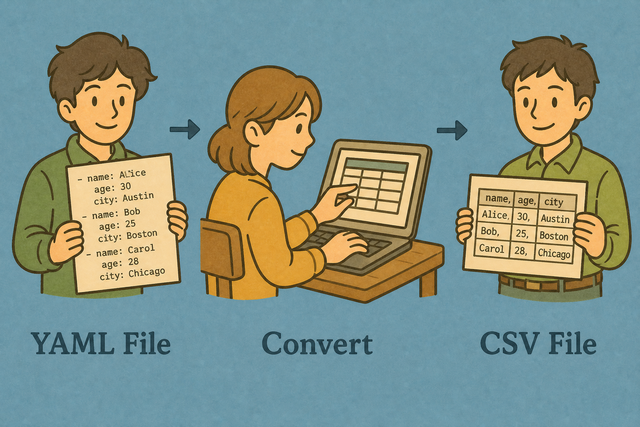
1. Add YAML data
2. Convert to CSV
3. Copy or download the result
Supported formats
Add YAML data
You can paste YAML, upload a file, or use the example
Conversion status
No YAML data to convert
You can paste YAML, upload a file, or use the example
CSV output
A list of YAML maps becomes rows with consistent CSV columns.
How to use YAML to CSV
A YAML list can be readable in a configuration file but difficult to sort in a spreadsheet. For example, three maps with the same Name, Age, and City keys can become one CSV header and three rows. This converter keeps the transformation in your browser, so the source data stays on your device while you make a table for a spreadsheet, database, or script.
- You can add your data. Paste YAML or upload a file. Local conversion keeps the input on this device.
- You can check the separator. Choose comma, semicolon, tab, or pipe so each CSV field lands in the intended column.
- You can review the CSV. Copy or download the result after checking the header and values. A quick review catches separator and column errors before another tool reads the file.
What YAML and CSV mean
What is YAML?
YAML uses indentation to describe data. A list of maps such as Name and City converts well because each map can become one row, while nested values may need flattening because CSV has rows and columns rather than nested objects.
What is CSV?
CSV, or comma-separated values, is a plain text table with one row per line. Fields can use commas, semicolons, tabs, or pipes, and the chosen separator matters because a reader uses it to find column boundaries.
YAML to CSV example
Example YAML input
- Name: Ada
  Age: 36
  City: London
Example CSV output
Name,Age,City
Ada,36,London
Lin,29,Taipei
Common YAML to CSV problems
Will leading zeros disappear?
A value such as "00123" can lose its first zeros when a spreadsheet interprets it as a number. Quoting the field keeps the zeros in the CSV, and setting the destination column to Text keeps them visible after import.
Why is everything in one column?
The reader may expect commas while the file uses semicolons or tabs. Select the file separator under Value Separator so the reader can split each row at the correct boundary.
What about text encoding?
UTF 8 is the safest choice for accented characters and other international text. If characters look wrong, the source may use a different encoding, so a new UTF 8 export helps the CSV reader interpret the bytes consistently.
YAML to CSV FAQ
Does YAML to CSV upload my file?
No. A YAML list of maps converts in your browser. For example, a customer list can become CSV rows without sending the source file to a server.
The method works because the converter reads the pasted text or selected file on this device. You can review the CSV, copy it, or download it while keeping the original data local.
What YAML format works best?
A list of maps such as `- key: value` works best because each map can become one row and each key can become a column. For example, repeated Name and City keys produce a consistent table.
You can use the example as a model, then check that records use matching keys. Consistent keys reduce blank cells and make the CSV easier for another tool to read.
Can I go back from YAML to a spreadsheet?
Yes. CSV is a plain text table that spreadsheet programs can open. For example, a YAML record with Name, Age, and City becomes one row under those three headers.
You can copy the output or download the CSV, then check the separator and text values after import. This review matters because a spreadsheet may interpret dates or leading zeros differently from the original YAML.
What YAML converts to CSV?
A list of maps with key and value pairs converts into rows and columns. Nested YAML can become text in a cell, because CSV does not have native nested objects.
A flat structure works best when the destination expects a table. Flatten or simplify nested values first when each value needs its own column.
Are YAML comments kept?
Comments are ignored during conversion, so only YAML keys and values become CSV fields. For example, a line beginning with a comment marker does not create a column.
You can keep important notes in a data field if the notes must appear in the CSV. This works because comments describe the YAML source but are not table values.
Can I convert Kubernetes-style YAML?
Simple lists of objects can convert when each object has fields that fit a table. Files with multiple documents separated by three hyphens may need to be split first.
You can check one document at a time when the file contains different object types. This prevents unrelated fields from being mixed into one header row.