XML to CSV Converter
XML stores fields inside tags, while CSV stores one table row per line. For example, repeated
How XML to CSV works
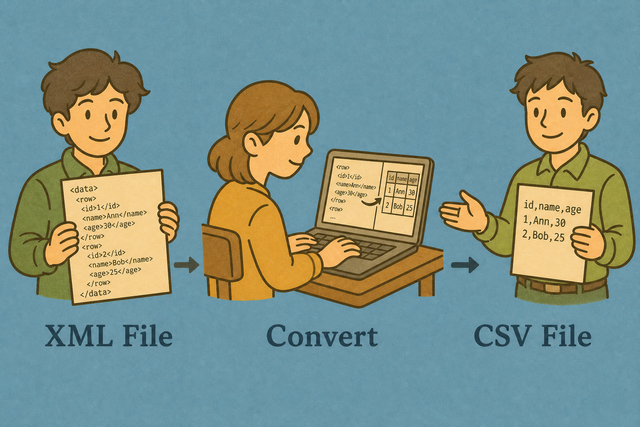
1. Add XML
2. Choose a separator
3. Review and download CSV
Supported formats
Add XML data
Add XML with repeating child elements
Parsing Status
No data to parse
Add XML with repeating child elements
CSV output
You can turn repeating XML records into a CSV table that you can review and download.
Convert XML to CSV in three steps
A document such as
- You can add XML. A root with repeating child elements gives the converter clear rows.
- You can check the structure. Child tag names become headers, while mixed deep trees may need preparation first.
- You can review and download CSV. The result contains values only, so it fits tools that accept a plain table.
How XML and CSV store data
What XML contains
XML stores each field between tags. A repeated structure such as
What CSV contains
CSV, or comma-separated values, stores one row per line and separates fields with commas, semicolons, tabs, or pipes. It contains values rather than formulas or styling, so a consistent separator helps the next table tool read each column correctly.
XML to CSV example
Example XML input
<rows>
  <row><Name>Ada</Name><Age>36</Age><City>London</City></row>
</rows>
Example CSV output
Name,Age,City
Ada,36,London
Lin,29,Taipei
Common XML to CSV problems
Will CSV keep leading zeros?
A value such as "00123" can lose its first zeros in a spreadsheet application even when the CSV contains them. The converter keeps the value while it creates the file, so checking the raw CSV helps separate a conversion issue from display behavior.
Why does everything appear in one column?
The separator may be a semicolon or tab instead of a comma. Choose the separator that appears between fields, because a matching value tells the next tool where one column ends and the next begins.
What about UTF 8 text?
Text such as é or 中文 can look wrong when the source uses a different character encoding. UTF 8 is a practical choice for the source and the saved CSV because it supports a wide range of characters consistently.
XML to CSV questions
Does XML to CSV upload my file?
No. The converter reads repeating XML elements in your browser and creates CSV locally. A sample with repeated rows stays on your device while the table is built.
This works because the page parses the document without sending it to a server. You can review the output, copy it, or download it when the columns and values look right.
Will nested XML become columns?
Child tag names become headers when the XML has repeating row elements. For example, repeated item elements with Name and Price children can produce Name and Price columns.
Deep mixed trees may need flattening first because one CSV row cannot represent every branch of a nested document. Check the output against the source so missing or repeated values are visible before import.
Can I convert XML to CSV without spreadsheet software?
Yes. Add XML with repeating child elements, choose the value separator, and download CSV from this page. CSV stores a plain table, so a spreadsheet application is not required for the conversion.
This works because the converter creates text rows and headers directly in your browser. You can inspect the downloaded file with any tool that reads CSV.
How do I convert XML to CSV?
A useful XML example has a root element with repeated rows and fields such as Name and City. Add that XML, then choose a separator that matches the CSV format your next tool expects.
The converter uses child tag names as headers and repeating elements as rows. Review the preview, then copy or download the CSV so you can catch structure or encoding issues before import.
What XML structure converts best?
A root element with repeated child elements converts most clearly. For example, repeated <row> elements with the same <Name>, <Age>, and <City> children map to stable CSV columns.
This structure works because each repeated element represents one row and each child tag represents one field. Mixed branches and irregular fields can produce incomplete columns, so compare the CSV with the source.
Can I convert nested XML to CSV?
Yes, when the nested document contains a clear repeating row element. Repeating siblings can become rows, while fields several levels deep may need flattening so each CSV row has a consistent set of columns.
This works because CSV is a flat table and cannot preserve every parent and child relationship in one cell structure. Review nested fields in the output and prepare the XML first if important values are missing.
Does XML to CSV need an XSD?
No. The converter reads tag names from the XML document itself, so a separate XSD is not required for a regular repeating row structure.
An XSD can describe rules for an XML document, but it does not replace a clear row and field layout. Check the generated headers and values against the source before using the CSV.