KML to CSV Converter
A KML file can hold map placemarks, while a CSV file stores rows and columns. For example, a placemark with a name and coordinates can become one CSV row with Name, Longitude, and Latitude. This converter reads each Placemark and creates a practical table for analysis or import.
How the KML to CSV Converter works
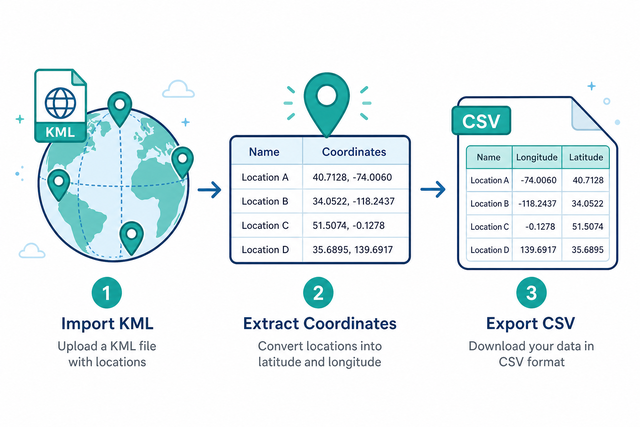
1. Paste KML
2. Read placemarks
3. Download CSV
Supported file formats
Import KML data
You can paste KML that contains Placemark elements
Conversion status
No KML data to convert
You can paste KML that contains Placemark elements
CSV output
One CSV row for each Placemark
Convert KML to CSV in three steps
A map export can be difficult to use when its placemarks remain inside XML. For example, a list of named locations is easier to filter after each Placemark becomes one CSV row. This converter reads the KML in your browser and creates columns for the fields it finds.
- You can paste KML Paste the XML text or use Upload. This keeps the source structure available to the parser.
- Read placemarks Each Placemark becomes a row with Name, Description, Longitude, Latitude, and Altitude. This gives location data a consistent tabular shape.
- You can download CSV Copy or download the result for a spreadsheet, database, or another converter. CSV works well because most data tools can read plain rows and columns.
What KML and CSV contain
What is KML?
KML is XML that stores map features such as placemarks. A Placemark can contain a name, description, and coordinates, so those values can become separate CSV fields.
What is CSV?
CSV, or comma separated values, is a plain text table with one row per line. Fields use a separator such as a comma, semicolon, tab, or pipe, which makes the file easy for data tools to parse.
KML to CSV example
Example KML input
<Placemark><name>Office</name><Point><coordinates>-74.006,40.7128,0</coordinates></Point></Placemark>Example CSV output
Name,Age,City
Ada,36,London
Lin,29,Taipei
Common KML to CSV problems
Polygons and MultiGeometry
A polygon can contain many coordinate pairs, but this converter exports the first pair for each Placemark. For example, a boundary may produce one representative longitude and latitude, so a full shape needs a tool that preserves every coordinate.
Will leading zeros disappear?
CSV can retain leading zeros when a value is quoted, such as "00123". A spreadsheet may treat that value as a number after opening the file, while this converter does not remove the zeros during conversion.
Why is everything in one column?
The separator may be a semicolon or tab instead of a comma. Set Value Separator to the character used in the source, because matching separators lets each field occupy its own column.
What about UTF 8 and Windows 1252?
UTF 8 usually preserves accented characters across systems. If text looks incorrect, the source may use Windows 1252, so a UTF 8 export can prevent character changes during parsing.
KML to CSV conversion FAQ
Does KML to CSV upload my file?
No. The converter reads KML in your browser. For example, a file with private location names stays available to the local parser instead of being sent to a service. This approach works because the conversion happens on your device after the page loads.
How do I convert KML to CSV?
You can paste KML that contains Placemark elements, or use Upload, then review the CSV output. For example, a Placemark with a name and coordinates becomes one row with Name, Description, Longitude, Latitude, and Altitude. This method works because the converter maps each Placemark to a consistent set of CSV fields.
Are polygons supported?
The converter exports the first coordinate pair for each Placemark. For example, a polygon with many boundary points produces one representative longitude and latitude, not the complete boundary. This limit matters because CSV output here is row based rather than geometry preserving.
Which KML elements become rows?
Each Placemark becomes one CSV row. Name, Description, Longitude, Latitude, and Altitude become columns when those values exist, which gives a location list a predictable table structure.
Does KML to CSV support KMZ?
KMZ is a zipped KML file, and this converter does not unpack KMZ binaries. For example, after the archive is unzipped, the KML inside can be pasted or uploaded and parsed as usual. This separate step works because the page accepts KML or XML text rather than archive contents.
Can I convert a map export?
Yes. Export the map as KML, then paste or upload that KML here. Each Placemark becomes a CSV row, so named locations can be filtered or imported as ordinary table data.