JSON to CSV Converter
An API may return records as nested JSON, while your next step may need rows and columns. JSON to CSV turns an array of objects into a CSV table that you can review, share, or import into another system.
How JSON to CSV Works
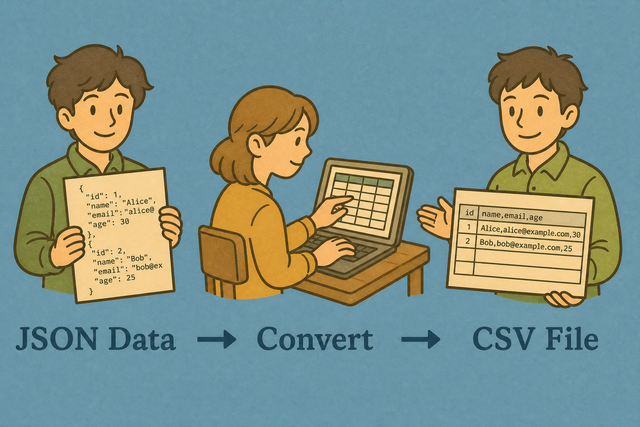
1. Add JSON
2. Choose a separator
3. Copy or download CSV
Supported Formats
Add JSON Data
You can add an array of objects, a single object, or column arrays
Parsing status
Waiting for JSON
You can add an array of objects, a single object, or column arrays
CSV output
Your converted CSV appears here
How to convert JSON to CSV
An API response such as [{"name":"Ada","age":36}] is easy for software to read but less useful as a table. JSON to CSV preserves each record as a row, so you can inspect fields and pass the result to a system that accepts CSV.
- You can add JSON. Paste an array of objects, a single object, or JSON Lines. The converter reads the keys and builds columns.
- You can choose the separator. Comma, semicolon, tab, and pipe separators cover common spreadsheet and import formats. The matching separator keeps each field in the right column.
- You can review and save CSV. Check the preview, then copy the table or download data.csv. A quick review catches missing keys and unexpected nested values before another system reads the file.
What JSON and CSV contain
What is JSON?
JSON stores values in objects with named keys, arrays, and nested structures. For example, an array with one object for each person maps naturally to rows, while each key becomes a possible column.
What is CSV?
CSV stores a table as text, with one record per line and fields separated by a chosen character. Commas, semicolons, tabs, and pipes are useful because the receiving spreadsheet or data system can split the same rows consistently.
Sample JSON and CSV
Example input
[
  {"Name": "Ada", "Age": 36, "City": "London"},
  {"Name": "Lin", "Age": 29, "City": "Taipei"}
]
Example output
Name,Age,City
Ada,36,London
Lin,29,Taipei
The two objects share the keys Name, Age, and City, so those keys become the header row. The same pattern works for API records with different values, but a missing key can produce an empty cell that deserves a quick review.
Common JSON to CSV problems
Nested data does not form separate columns
A nested value such as {"address":{"city":"London"}} is not a flat field. The converter keeps that object in one cell, which preserves the value but does not create a column for every nested key.
Leading zeros change after opening CSV
A value such as 00123 can lose its zeros when a spreadsheet guesses that the field is a number. Keep the source value quoted and check the column type after opening the file, because the conversion itself does not remove the zeros.
All values appear in one column
A separator mismatch causes this result, for example when a semicolon file is read as comma separated. The selected Value Separator must match the file or receiving system so fields split into the intended columns.
Text characters look wrong
Accented characters can look incorrect when the source uses a different encoding from the text you pasted. UTF-8 is the clearest shared choice for JSON and CSV because it represents a broad range of characters consistently.
Convert JSON to CSV in code
import csv, json
rows = json.load(open("data.json"))
w = csv.DictWriter(open("out.csv","w",newline=""), fieldnames=rows[0])
w.writeheader(); w.writerows(rows)
This example expects an array of objects with shared keys. A stable key set helps the code create predictable headers and rows.
JSON to CSV questions
Does JSON to CSV upload my file?
No. JSON is parsed in your browser, so the conversion does not send the pasted data to a server. This is useful for private records because the input stays in the current browser session.
Can I convert a JSON array of objects to CSV?
Yes. An array such as [{"name":"Ada","age":36}] becomes a CSV table with name and age as columns. Each object supplies a row, which makes this shape practical for API responses.
What JSON shapes does JSON to CSV accept?
The converter accepts an array of objects, a single object, and an object whose values are column arrays. These shapes cover row based records and column based data, so you can choose the form that matches your source.
How do I convert JSON to CSV?
You can add JSON, choose a value separator, review the CSV preview, and copy or download the result. Reviewing the preview matters because it reveals missing keys, nested values, or a separator that does not match the receiving system.
What JSON shapes convert to CSV?
An array of objects, a single object, a column map of arrays, and JSON Lines can convert to CSV when the records form a consistent table. Consistent keys help produce predictable headers and rows.
How are nested JSON objects handled?
Nested objects are represented as a value in one CSV cell rather than as separate columns. If you need one column for each nested key, flatten the JSON before conversion so the table has a clear schema.
Can I convert JSON to CSV with a semicolon delimiter?
Yes. Choose Semicolon in Value Separator when the receiving spreadsheet or data import expects semicolon separated fields. Matching that setting prevents commas inside values from being mistaken for column breaks.