JSON to XLS Converter
A JSON export can hold useful records inside nested objects, while a spreadsheet needs clear rows and columns. For example, an array with Name, Age, and City keys becomes one table with those keys as headers. JSON to XLS converts that array into a spreadsheet XML workbook in your browser, so you can review the table before you download it.
How JSON to XLS works
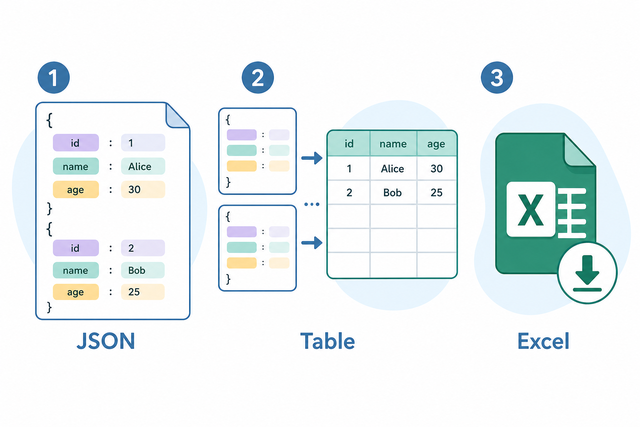
1. Paste JSON
2. Review the table
3. Download spreadsheet XML
Supported Formats
Import JSON data
A JSON array of objects creates rows from object keys
Parsing Status
No data to parse
A JSON array of objects creates rows from object keys
Spreadsheet XML output
You can review the converted table, then copy or download the spreadsheet XML workbook
How to convert JSON to XLS
An API response often stores each record as an object, but a spreadsheet reader needs visible columns. For example, [{"Name":"Ada","City":"London"}] can become a row with Name and City headers. JSON to XLS parses the array in your browser and creates one workbook, which keeps the conversion easy to inspect.
- You can paste JSON. An array of objects gives the converter rows and keys give it headers.
- You can review values. Numbers and booleans can remain typed, while nested objects become text in one cell.
- You can download XLS workbook. The .xls XML workbook opens in spreadsheet applications that support this format.
JSON and XLS workbook in this workflow
What is JSON?
JSON, or JavaScript Object Notation, stores records as objects with named keys. An array of objects works well for tabular conversion because each object can represent one row and each key can represent a column.
What is an XLS workbook?
An XLS workbook can hold formulas, styles, and multiple sheets. This converter places the JSON values in one spreadsheet XML table, which gives you a clear starting point for review.
Sample JSON input and spreadsheet table
Example JSON input
[
  {"Name": "Ada", "Age": 36, "City": "London"},
  {"Name": "Lin", "Age": 29, "City": "Taipei"}
]
Example table output
Name,Age,City
Ada,36,London
Lin,29,Taipei
Common JSON to XLS problems
Will leading zeros disappear?
A value such as "00123" can lose its first zeros after a spreadsheet application reads it as a number. The converter keeps the quoted value during conversion, so the column can be formatted as Text after download when the zeros matter.
Why is everything in one column?
This usually means the source uses a delimiter that does not match the import setting. A JSON array does not need a CSV delimiter, but a related CSV workflow works when the separator matches the source, because each value can then occupy its intended column.
What about UTF 8 text?
Text such as café or São Paulo can look wrong when the source uses a different character encoding. UTF 8 is a practical choice for JSON because it preserves a broad range of characters consistently across systems.
JSON to XLS converter FAQ
Does JSON to XLS upload my file?
No. The JSON is parsed in your browser, and the spreadsheet XML workbook is built there. This keeps the source data on your device during conversion. The page needs the converter code to load, but the JSON content is not sent to a conversion server.
How do I convert JSON to XLS?
You can paste an array of objects or upload a JSON file, then review the table and select Download. The object keys become column headers, and each object becomes a row. This method works because the array gives the converter a consistent record structure.
Can spreadsheet software open the download?
Yes. The download is a spreadsheet XML workbook with an .xls filename. You can open it in a spreadsheet application that supports spreadsheet XML, then check the headers and values before further editing.
How do I convert a JSON array to XLS?
A JSON array of objects converts directly into a table. You can paste the array, review the generated rows, and download the spreadsheet XML workbook. Each object becomes a row, while matching keys become columns.
Will nested JSON become extra sheets?
No. A nested object or array becomes text in one cell rather than an extra sheet. You can flatten the source data first when one nested field needs its own column, because the converter creates one table.
Can spreadsheet software open JSON to XLS output?
Yes. You can import the downloaded .xls XML file into a spreadsheet application that supports this format. Review the imported values and headers because the download contains one table, not separate sheets for nested objects.