XLS to JSON Converter
A spreadsheet can show a clear table while an API expects JSON objects. XLS to JSON conversion maps each row to a record so your data can move between a sheet and a JSON based workflow.
How XLS to JSON works
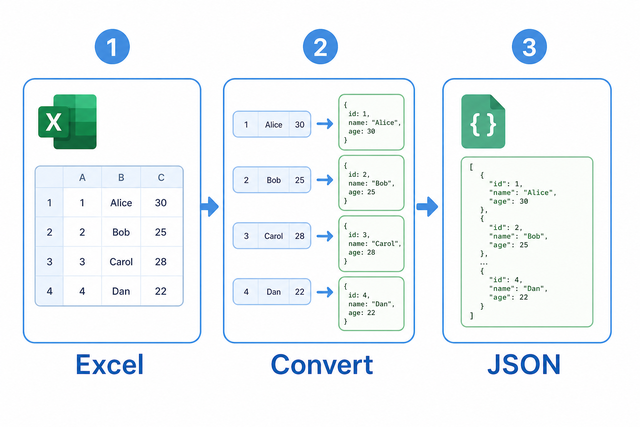
1. Paste the table
2. Check the header row
3. Copy the JSON
Input and output formats
Import spreadsheet data
You can paste spreadsheet XML or copied sheet cells
Parsing Status
No data to parse
You can paste spreadsheet XML or copied sheet cells
JSON Output
Each spreadsheet row becomes one JSON object
How to convert spreadsheet data to JSON
A spreadsheet row can look correct in a sheet but fail in a system that expects named JSON fields. For example, a row with Name, Age, and City becomes one object with those three keys. XLS to JSON runs in your browser, so the conversion suits a single table that needs a structured JSON result.
- You can paste the sheet. Copy cells or spreadsheet XML. The first row becomes headers when the option is selected.
- You can check the JSON options. Array Format produces a list of row objects, which matches common API input.
- You can review and copy the result. A quick check catches shifted columns before another system reads the data.
XLS workbook and JSON have different roles
What an XLS workbook contains
A spreadsheet workbook can contain formulas, styles, and multiple sheets, while a flat table contains values in rows and columns. For example, a workbook with several tabs must be reduced to the table you want to convert. This tool reads the selected table values because JSON represents records, not workbook layout.
What JSON contains
JSON, or JavaScript Object Notation, stores named values inside objects. For example, the headers Name and City can produce {"Name":"Ada","City":"London"}. An array of these objects keeps each spreadsheet row separate and gives the receiving system stable field names.
Sample spreadsheet and JSON
Example spreadsheet input
Name,Age,City
Ada,36,London
Lin,29,Taipei
Example JSON output
[
  {"Name": "Ada", "Age": 36, "City": "London"},
  {"Name": "Lin", "Age": 29, "City": "Taipei"}
]
Common conversion problems
Will leading zeros disappear?
A value such as "00123" can lose its zeros when a spreadsheet treats it as a number. Keep the value quoted or format the source column as Text, because the converter preserves the value it receives.
Why is everything in one column?
The separator may be a semicolon or tab instead of a comma. Choose the matching Value Separator, because the parser uses that character to find each column.
What about UTF 8 and Windows 1252?
Text can look wrong when the source uses Windows 1252 and the pasted data uses a different encoding. Use UTF 8 when possible, because it preserves accented characters across current data tools.
XLS to JSON questions
Does XLS to JSON upload my file?
No. Pasted cells and spreadsheet XML are processed in your browser. This matters when a spreadsheet contains personal or operational data, because the conversion does not require a file upload.
How do I convert XLS to JSON?
You can paste a table with its headers in the first row, check the separator, and review the JSON preview. This maps each row to named fields, so the output is easier for an API or script to read.
Does it support .xlsx binaries?
This page accepts copied sheet cells and spreadsheet XML, but it does not unpack binary .xlsx files in the browser. Convert the workbook to a supported table or XML form first, because the converter needs readable cell data.
Does this converter support binary .xlsx files?
Binary .xlsx unpacking is not enabled here. Use copied sheet cells or spreadsheet XML when you need a single table, because those inputs expose the values this converter can map to JSON.
How do I convert spreadsheet rows to a JSON array of objects?
You can keep the header row enabled and leave Array Format selected, then review the result. The header cells become object keys and each later row becomes one object, which keeps records separate.
Are spreadsheet dates converted to ISO strings?
Dates remain in the form supplied by the sheet, so they are not automatically converted to ISO 8601 strings. Reformat the source dates before pasting when a receiving system requires a fixed date format, because the converter preserves input text.