Phone Number Extractor
A contact export can mix names, notes, and phone numbers in one block of text. Phone Number Extractor finds the numbers, removes repeated matches, and creates Phone, Digits, and Line columns for a cleaner CSV.
How Phone Number Extractor Finds Numbers
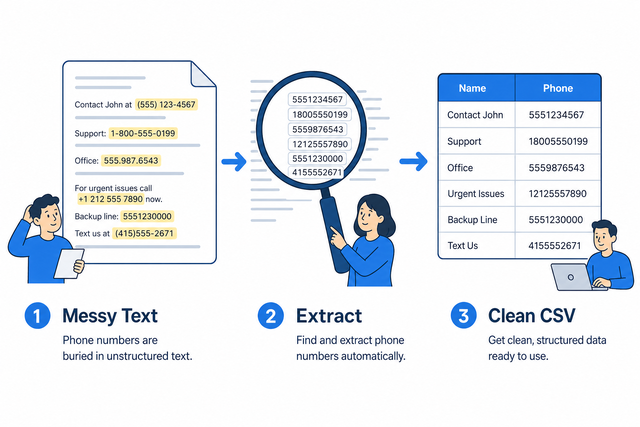
1. Paste text
2. Find phone numbers
3. Download CSV
Supported Formats
Extract Phone Numbers
You can paste emails, call notes, logs, or copied page text that contains phone numbers
Parsing Status
No data to parse
You can paste emails, call notes, logs, or copied page text that contains phone numbers
Phone CSV
Unique numbers with digit-only and source line
How to extract phone numbers to CSV
A copied contact list can place several phone formats beside names and notes, which makes manual selection slow and inconsistent. This phone number extractor creates a CSV with one row per unique match, so the result is easier to review and reuse.
- You can paste unstructured text. Emails, call logs, and copied web pages can contain the numbers you need.
- Detect numbers. International prefixes, dashes, and parentheses are normalized into a Digits column, which makes comparison easier.
- You can download the list. Review the rows first, then use Extract CSV or Anonymize CSV when another step needs the file.
What CSV input and output mean
What is CSV?
Phone numbers often arrive in text, while CSV stores them in rows and columns. CSV is a plain text table with fields separated by commas, semicolons, tabs, or pipes, so this tool can turn scattered matches into a consistent list without adding formulas or styling.
Sample input and output
Example input
Name,Age,City
Ada,36,London
Lin,29,Taipei
Example output
Name,Age,City
Ada,36,London
Lin,29,Taipei
Common phone extraction problems
Are extensions and letters kept?
A line such as “Call 212 555 0198 ext 123” contains a main number and an extension. The extractor keeps digit runs of seven or more, while an extension such as x123 may be omitted, so the CSV can be reviewed before use.
Will leading zeros disappear?
A value such as "00123" can lose its first zeros in a spreadsheet. CSV preserves quoted zeros during conversion, and the extractor does not remove them, so the destination column can be treated as Text when needed.
Why is everything in column A?
If every value appears in column A, the source may use semicolons or tabs instead of commas. The Value Separator setting needs to match the source delimiter because the parser uses it to split fields.
What about UTF-8 vs Windows-1252?
A name such as “José” can look incorrect when the source uses Windows-1252. UTF-8 input keeps accented characters consistent across systems, so the source file should be saved or exported as UTF-8 when possible.
Phone Number Extractor FAQ
Does the phone extractor upload my text?
No. The extractor finds numbers in this browser tab, so pasted text stays on your device.
This works because the conversion runs locally. You can review and download the CSV without sending the source text to a server.
How do I extract phone numbers to CSV?
You can paste emails, logs, or copied page text into the input area. The result contains unique matches in Phone, Digits, and Line columns.
You can review the rows before downloading because the source line helps you confirm each number and its context.
Are extensions kept?
Digit runs of seven or more are extracted, but an extension such as x123 may be omitted.
You can review the source line and add an extension later if your workflow needs it. This keeps the main phone number separate from nearby notes.
Which phone formats are detected?
The extractor detects international numbers with a plus prefix, dashed US numbers, and parenthesized area codes with seven or more digits.
It reads text, so pasted emails, CRM exports, and copied web pages work. A PDF must provide extracted text first.
Does the extractor pull numbers from PDFs?
The tool reads text, not binary PDF files. Paste the PDF text after it has been extracted.
This method works because the extractor scans characters in the input. It cannot inspect a PDF file that has not been converted to text.
Are duplicate numbers removed?
Yes. The output lists unique numbers and includes a digit only value plus the source line.
Deduplication gives you a shorter review list while the Line column keeps useful context for checking the result.