Split CSV Online by Row Count
A large CSV export can exceed an email attachment limit or open slowly in a spreadsheet app. Split it into parts with a set number of data rows so each file is easier to share, inspect, or import.
How CSV Splitting Works
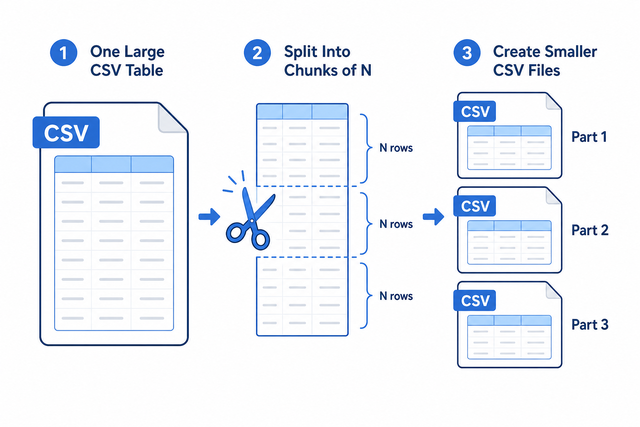
1. Import a CSV
2. Set rows per file
3. Copy or download chunks
Supported Formats
Import CSV to Split
A CSV can come from a table export or a text file. Choose the separator that matches its columns so quoted values and fields stay aligned.
Input status
No CSV data yet
A CSV can come from a table export or a text file. Choose the separator that matches its columns so quoted values and fields stay aligned.
Split CSV output
Each part includes the header row
How to split one CSV into multiple files
A large CSV becomes difficult to send or open when one file contains more rows than the next system can handle. For example, a yearly export may need separate monthly sized parts for review or import. This tool processes the text in your browser, so the source stays on your device while you create smaller CSV files.
- You can import the CSV. Paste or upload the file you want to split.
- You can set rows per file. Choose the number of data rows in each part. The header is copied into every chunk, which keeps each part usable on its own.
- You can copy or download the parts. The output lists each part so you can save every block as a separate CSV.
CSV structure and splitting
What is CSV?
CSV, or comma separated values, stores a table as text, with one row per line and fields separated by commas, semicolons, tabs, or pipes. A file with columns such as Name, Age, and City can move between data tools because it stores values rather than formulas or visual styling.
Sample input and output
Example input
Name,Age,City
Ada,36,London
Lin,29,Taipei
Example output
Name,Age,City
Ada,36,London
Lin,29,Taipei
Common CSV splitting problems
Does each split file keep the header?
Yes. The header row is repeated at the top of every part, so each file keeps its column names.
Can a CSV keep leading zeros?
CSV keeps zeros when the field is quoted, such as "00123". A spreadsheet app can display that value as a number unless the column uses Text, but this tool does not remove the zeros.
Why does everything appear in one column?
The separator probably does not match the file. Set Value Separator to semicolon or tab when the source uses that character, because the parser then can recognize each field.
What about UTF-8 and Windows-1252?
UTF-8 is the safer choice for accented characters and other non ASCII text. If characters look wrong, the source may use Windows 1252, so a UTF-8 export can prevent damaged text in the split files.
Split CSV FAQ
Does Split CSV upload my file?
No. The split happens in your browser, so the CSV text stays on your device during processing. This suits customer lists and other files that should not leave your computer.
How do I split a CSV file into multiple files?
You can set Rows per file, then paste or upload the CSV. Each output part contains that number of data rows, and the header is repeated so every file keeps its column names.
Is this a CSV splitter for large files?
Yes, it splits a CSV by data rows. Smaller parts can be easier for an email attachment, a repository, or a spreadsheet app to handle, while the practical size depends on available browser memory.
Does every split file keep the header?
Yes. When First row contains column names is selected, the header is copied to every part. Each CSV can then be opened or imported with its field names intact.
How small can each CSV chunk be?
Rows per file accepts 1 or more. A value of 1 creates one data row per part, while a larger value reduces the number of output files.
Can I split a CSV by file size instead of rows?
This tool splits by rows, not bytes. You can adjust Rows per file and check the resulting text until each part fits the destination, because row lengths can vary within one CSV.